
Plug and Charge lets you connect your EV to a compatible charger and start charging without opening an app or tapping a card each time. In ISO 15118 Plug and Charge, the system automatically authorizes the session and links it to your charging account for billing.
You may also see “Plug & Charge” on a home charger’s product page. There, the name may describe a simpler automatic start mode: plug in your car, and charging begins without manual approval. That label alone does not confirm ISO 15118 support.
This guide explains how Plug and Charge works, how to check if you can use it at public chargers, and how billing works. We’ll also explain what automatic starting means for home charging.
What Is Plug and Charge?
According to CharIN, ISO 15118 Plug and Charge enables automatic identification and authorization without an app or RFID card at each session. ISO 15118 defines communication between an EV and a charger.
The system uses a digital certificate stored in the vehicle to verify its charging credentials. This certificate links the session to a charging contract—the service agreement associated with your charging account. At public chargers, that link also allows the service to bill the correct account.
A matching connector alone does not confirm Plug and Charge compatibility. Your vehicle, the charging point and your charging service must also support the feature.
How Does Plug and Charge Work?
Plug and Charge exchanges charging credentials through the cable, checks them and authorizes the session automatically. Once you have activated the feature, a typical Plug and Charge session at a compatible public charger follows these steps:
- Establish Communication: Your EV and the charger connect and exchange information through the charging cable.
- Verify Charging Credentials: The system checks the vehicle’s contract certificate to confirm that it can use the linked charging service.
- Authorize and Start Charging: The service approves the session. Power flows once authorization is complete and the vehicle and charger are ready.
- Record Energy Use: The system records the session’s energy use and sends billing details through your linked account.
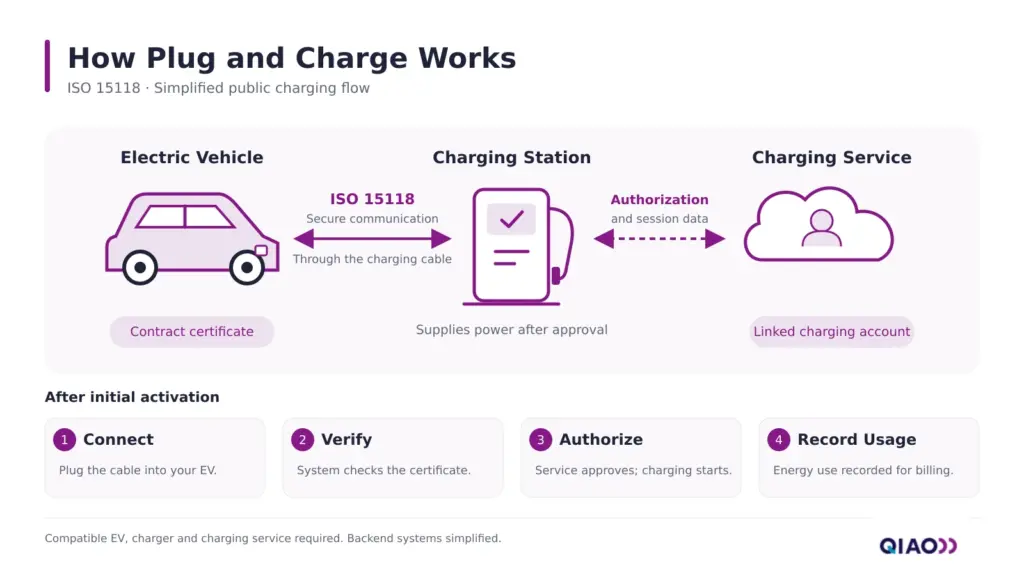
ISO 15118 handles communication between the vehicle and charger. The charger can use OCPP to communicate with its management platform. OCPP support alone does not confirm Plug and Charge support.
Before leaving your car, check the vehicle display or charger screen to confirm that charging has started.
What Are the Benefits of Plug and Charge?
Plug and Charge reduces the steps needed to start a public charging session. After the initial setup, you can plug in at a supported charger without opening an app, selecting a charging point or tapping an RFID card.
That convenience becomes more useful when you charge away from home regularly. On a road trip, it removes the same manual steps at each supported stop. In wet or cold weather, it also means less time handling your phone or finding a charging card.
The benefit is a simpler start to charging. Plug and Charge does not increase your vehicle’s charging power or guarantee a lower price. Charging speed still depends on your EV, the charger and current conditions, while the rate depends on the charging plan used.
Can Your EV Use Plug and Charge?
Your EV can use public Plug and Charge when the vehicle, charging point and charging account support it together. Check these four items before your first use.
| What to Check | What to Confirm | Where to Check |
| Your EV | Your exact model and model year support Plug and Charge in your market with the required hardware and software. | Your vehicle manufacturer’s website, owner’s manual or support team. |
| The Charging Point | Your chosen charging service offers Plug and Charge at that specific point. | Your charging app’s map or the charging network’s location details. |
| Your Charging Account | Your account or charging plan supports Plug and Charge at that location. | Your charging service’s app or support team. |
| Activation Status | You have completed enrollment and enabled any required vehicle settings. | Your vehicle manufacturer’s or charging service’s activation instructions. |
A charger’s Plug and Charge label confirms only part of the picture. Electrify America, for example, states that its chargers support the feature, but vehicle eligibility and enrollment still apply.
How to Activate It
Follow the setup instructions for your vehicle and charging service. You may need to link your vehicle to an eligible account, enroll in Plug and Charge and enable it in the car. The setup process handles or guides you through any required certificate installation; you do not normally handle certificate files yourself.
Complete any first-use steps specified by the service. After activation, routine charging at supported points should require only plugging in.
How Are Public Plug and Charge Sessions Billed?
Public Plug and Charge sessions are billed through your linked charging account. The service behind that account sets the rate according to your plan, which may differ from the charging network’s direct payment price.
Membership discounts or charging credits apply only when the plan used for the session includes them. A subscription linked to a different charging account does not automatically apply.
When activating the feature, confirm which account will be billed and what benefits it includes. Check that service’s pricing for any session or idle fees, then review your first paid session’s receipt to confirm the charges.
Plug and Charge vs. Autocharge, RFID and App Charging
These methods differ in how they authorize charging and what you need to do at each session. The table below compares their usual operation after any required setup.
| Method | How It Authorizes Charging | What You Do Each Session |
| ISO 15118 Plug and Charge | Verifies charging credentials through a digital contract certificate. | Plug in at a supported charger. |
| Autocharge | Matches a vehicle identifier to an enrolled charging account. | Plug in at a supported charger after enrolling your vehicle. |
| RFID | Checks a card or key fob against approved users or accounts. | Tap your card or key fob at the charger. |
| App Charging | Uses your signed-in account to request authorization. | Select the charging point and start the session in the app. |
| Home Automatic Start | Requires no user authentication in unrestricted mode. | Plug in; charging begins when the vehicle and charger are ready. |
Here, “Home Automatic Start” describes charging without user authentication. ISO 15118 Plug and Charge can also be supported by home chargers.
Plug and Charge and Autocharge can feel similar to the driver, but they use different identification methods. ISO 15118 Plug and Charge uses contract certificates. Autocharge typically matches a vehicle identifier, such as its charging communication module’s MAC address, to a registered charging account. Support for one method does not guarantee support for the other.
Do You Need Plug and Charge at Home?
You do not need ISO 15118 Plug and Charge to start charging automatically at home. A home charger with an automatic start mode can offer that everyday convenience without a public charging account.
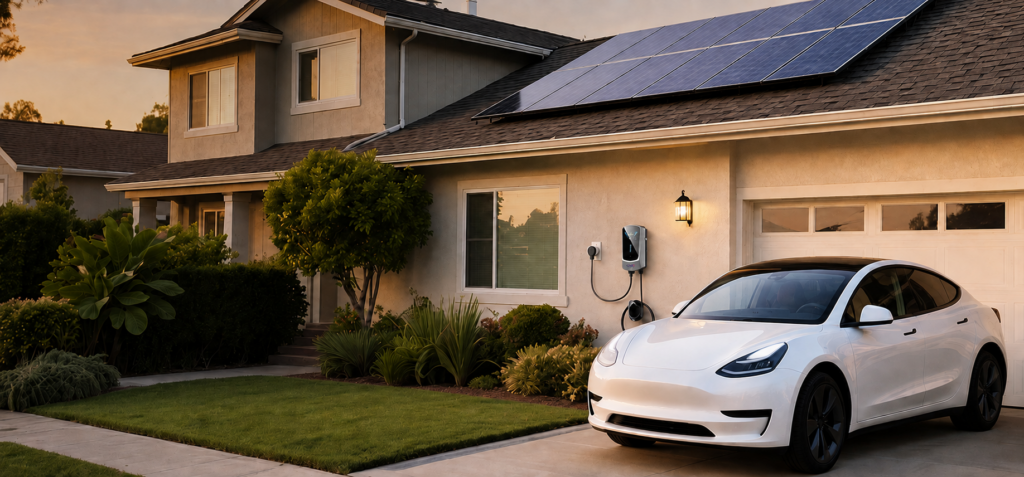
For a charger supplied through your household electricity meter, charging costs normally appear on your home electricity bill. You do not need a separate public charging account to pay for each session.
Automatic start suits a private garage or driveway where you control access. If others can access your charger, RFID access control can help limit charging to approved users. In an apartment building with shared chargers or separate billing, follow the building’s charging and payment rules.
Automatic start does not override your car’s charging schedule. The vehicle may wait until its scheduled charging time, even after you plug in.
When choosing a home EV charger, check the starting modes and access controls available on your chosen version.
FAQs
Yes. ISO 15118 Plug and Charge can work with AC as well as DC charging. However, your EV’s support for the feature at a DC fast charger does not automatically mean it supports it at an AC charger. Check AC compatibility separately for your vehicle and charging equipment.
The experience can look similar. Tesla drivers can plug in at a Supercharger, and payment is processed automatically through their Tesla account. That experience alone does not establish compatibility with ISO 15118 Plug and Charge on another network. Follow the compatibility guidance for your vehicle and the charging service you plan to use.
Read any error message on the vehicle or charger display first. Follow the instructions shown rather than repeatedly reconnecting the cable. If automatic authorization fails, try another payment method supported by the charger. Depending on your vehicle, you may need to disable Plug and Charge before starting the session another way. Follow your manufacturer’s instructions.
Yes, where the charger accepts those methods. Follow your vehicle’s instructions to bypass automatic authorization; some vehicles allow you to authorize through another method before plugging in. The account used for that session determines the applicable price, so check its rate and benefits before starting.
Choose the Right Charging Experience
Plug and Charge can simplify public charging when your vehicle and charging service support it. Start with your manufacturer’s compatibility guidance, complete the recommended activation process and confirm the plan linked to your account.
For home charging, focus on how you want to use the charger each day. Check its starting modes, access controls and scheduling options. A “Plug & Charge” label alone does not tell you which authorization method it uses, so look for a clear feature description before choosing your equipment.
About QIAO Charger
QIAO Charger develops and manufactures AC EV charging equipment for home, travel and commercial use. Our home EV chargers offer automatic start, RFID authorization or app control, depending on the model and configuration. Our portable EV chargers offer automatic start, with app control available on selected versions. We help you choose equipment based on your vehicle, electrical supply and how you want to start and manage charging.
We also work with distributors, retailers and partners bringing AC EV charging products to their markets. If you are building a local product range, contact QIAO Charger about a partnership to discuss product selection, documentation and supply requirements.