
Open Charge Point Protocol (OCPP) 2.0.1 expands device management and changes transaction reporting compared with OCPP 1.6. It also adds security features and built-in support for ISO 15118.
The protocol connects chargers with management software. Versions 1.6 and 2.0.1 are not directly compatible. However, OCPP 1.6 can still meet your needs when the charger and platform support the functions you require.
Choose a version based on your platform, charging requirements, and the exact charger model and firmware. This guide compares the differences for commercial AC charging, explains their practical impact, and outlines what to check before migration.
OCPP 1.6 vs 2.0.1: Key Differences at a Glance
The Open Charge Alliance’s overview explains the main changes in OCPP 2.0.1. The table below compares protocol capabilities; actual support depends on the charger and platform.
| Area | OCPP 1.6 | OCPP 2.0.1 |
| Transport and Format | SOAP/XML or JSON over WebSocket | JSON over WebSocket, with compression support |
| Device Management | Configuration keys and status reporting | A component-and-variable model for configuration and monitoring |
| Transactions | Separate start, stop, and meter reporting messages | TransactionEvent messages for transaction reporting |
| Security | Security profiles, certificate management, and secure firmware updates through OCA’s security extension for 1.6J | Defined security profiles, certificate management, and signed firmware updates |
| Charging Control | Charging profiles and power limits | Expanded controls, including charging information from compatible vehicles |
| ISO 15118 | No built-in support; Plug & Charge is possible through an OCA extension | Built-in support for ISO 15118-2 |
| Compatibility | Not directly compatible with 2.0.1 | Not directly compatible with 1.6 |
OCPP 1.6J means the JSON-over-WebSocket implementation of OCPP 1.6.
OCPP 2.0 and 2.0.1 are different releases. Confirm the exact protocol and firmware versions when comparing products.
A version label does not confirm every function. Check the supported features, security configuration, and certification scope of the specific charger and platform.
What Do These Differences Mean in Practice?
These changes affect how your platform manages chargers, records sessions, and supports security and charging functions.
Device Structure and Remote Configuration
OCPP 1.6 identifies a charging station and its connectors. OCPP 2.0.1 adds a separate EVSE level. An EVSE is the part of a station that supplies energy to one vehicle at a time. It may offer more than one connector.
For a two-socket charger, confirm whether both sockets can charge vehicles simultaneously. Socket count alone does not tell you how the charging capacity is arranged.
Separately, the OCPP 2.0.1 device model describes components and their variables, such as meter settings or temperature readings. A platform can read supported values, change writable settings, and request monitoring data.
This structure can support remote charger monitoring and management. Check which settings and monitoring functions the specific charger and platform implement.
Transaction Handling and Session Records
OCPP 1.6 reports transaction data through separate messages, including StartTransaction, StopTransaction, and MeterValues. OCPP 2.0.1 uses TransactionEvent to report transaction starts, updates, and ends. Each event includes a reason. This means multiple event messages per transaction, rather than one message for the entire session. StatusNotification still reports connector availability.
OCPP 2.0.1 also allows you to configure transaction start and stop conditions. For example, a transaction can begin when the cable is connected, before the driver presents an RFID card. Starting the record does not itself authorize charging.
Agree on these conditions with your platform supplier. Check that session records correctly link the authorization token, timestamps, and meter readings. After a connection loss, confirm that stored events reach the platform and appear in the correct session.
Security Profiles and Certificate Responsibilities
OCPP 2.0.1 defines security profiles, certificate management, security event logging, and signed firmware updates. OCPP 1.6J can also support additional security measures through OCA security extensions, when implemented by the charger and platform.
TLS protects the connection and allows the charger to verify the platform’s identity. With mutual TLS, the platform also checks the charger’s identity using a client certificate. An OCPP 2.0.1 label alone does not confirm that mutual TLS is supported or enabled.
Confirm the security profile configured on both sides and check the product’s certification scope. Agree on who installs and renews certificates, protects private keys, and restores access if a certificate expires. These responsibilities matter throughout operation, not just when the charger first connects.
Charging Profiles and Energy Management
Both versions support charging profiles that set current or power limits over time. OCPP 1.6 already supports smart charging and load balancing. OCPP 2.0.1 expands these functions and can pass charging needs from compatible vehicles to the platform.
If the platform sends a 16 A limit, check that the charger applies it. An accepted command alone does not prove that charging stays within the limit.
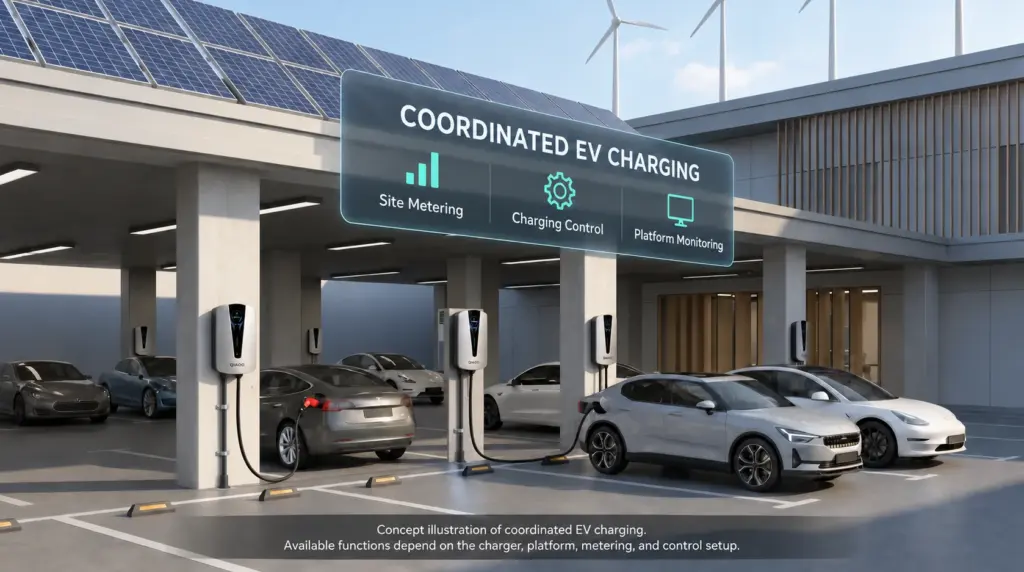
For dynamic load management and solar-aware charging, confirm how site meters provide data to the control system and how that system adjusts charging limits.
Upgrading OCPP does not increase a charger’s rated power. Actual charging power remains limited by the vehicle, charger, electrical supply, and active control settings.
ISO 15118 and Plug & Charge
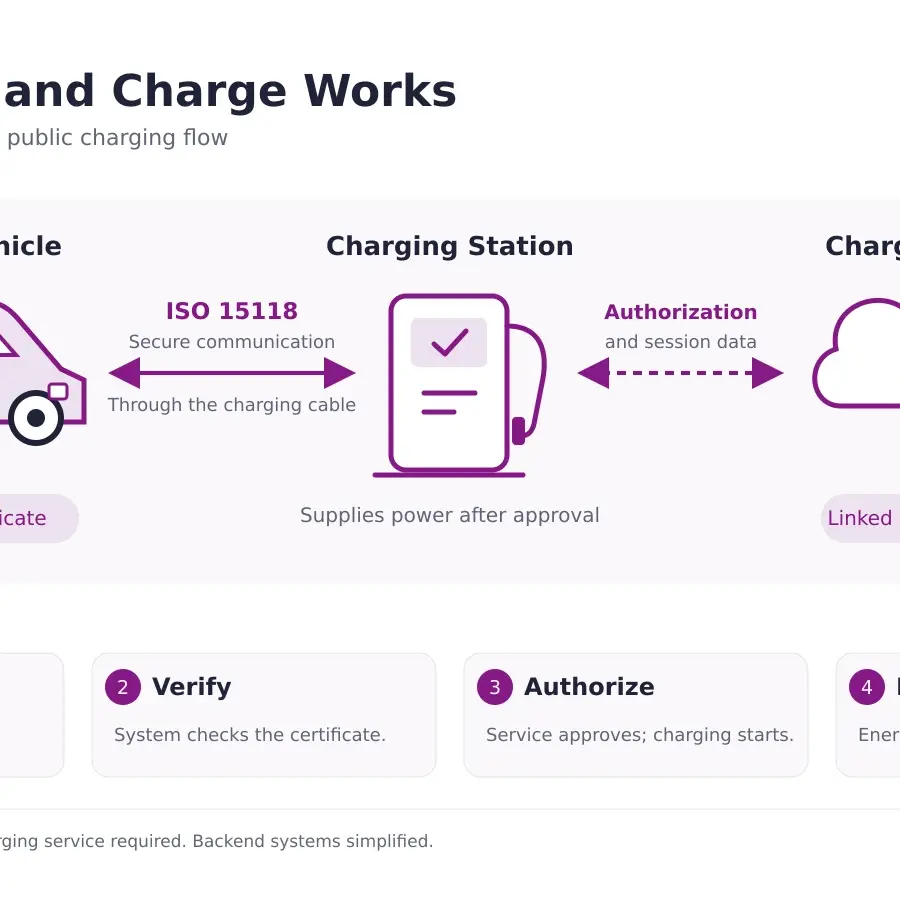
ISO 15118 handles communication between the vehicle and charger. OCPP connects the charger to its management platform. For ISO 15118 Plug & Charge, digital contract certificates allow the system to identify a charging contract and authorize charging.
OCPP 2.0.1 includes built-in support for ISO 15118-2 authorization and certificate management. OCPP 1.6 can support Plug & Charge through an OCA extension, when both the charger and platform implement it. This extension covers Plug & Charge authorization and certificate management, but not ISO 15118 smart charging.
In either case, confirm that the vehicle, charger hardware and firmware, platform, and certificate services work together. An OCPP version label alone does not guarantee Plug & Charge.
Also check what a supplier means by “plug and charge.” A private home charger’s automatic start mode does not itself confirm ISO 15118 certificate-based authorization.
Which OCPP Version Fits Your Charging Setup?
Start with the management platform you plan to use and the functions your project needs. Then check the exact charger model and firmware. Network size alone is not a reliable way to choose between OCPP 1.6 and 2.0.1.
| Your Setup | Suggested Approach |
| An existing OCPP 1.6 network that meets your needs | Keep using 1.6 while it meets your operating and security requirements. Plan a change when a specific requirement justifies the integration work. |
| A new AC charging project with basic access control, session records, and power limits | Compare supported 1.6J and 2.0.1 options on your chosen platform. A tested 1.6J setup may meet these needs; evaluate 2.0.1 against planned functions and support costs. |
| A project needing detailed device monitoring, configurable transaction boundaries, or built-in ISO 15118 support | Consider 2.0.1 if you need these functions. Confirm that the required functions are implemented and tested on the proposed charger and platform. |
| A network combining existing chargers with new models | Check whether the platform supports both versions and the functions each charger needs. Different protocol versions may require different configuration and support procedures. |
Compare total costs, including platform integration, testing, certificate management, firmware maintenance, and staff support. A lower hardware price may come with more setup work. Equally, a newer protocol may add functions that your project will not use.
For existing equipment, ask the manufacturer whether the exact model supports 2.0.1 and what an upgrade involves. Include any hardware changes, downtime, and retesting in the plan.
Choose a version that your suppliers can support for the planned life of the installation.
Can OCPP 1.6 and 2.0.1 Chargers Share One Platform?
Yes, if the charging station management system (CSMS) implements both versions. OCPP 1.6 and 2.0.1 are not directly compatible, but a platform can handle each version separately. Each charger must connect using a version that the platform supports.
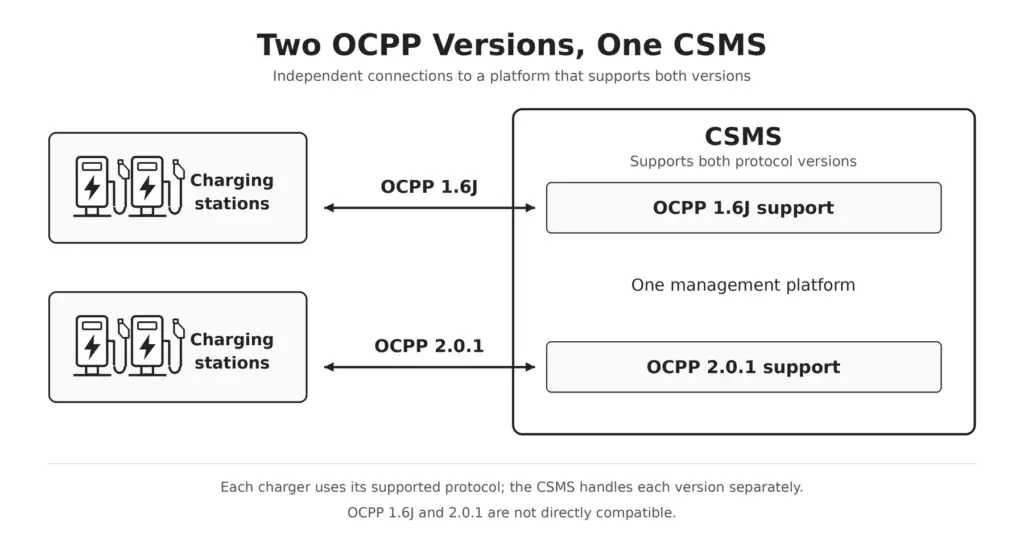
For example, existing 1.6J chargers can remain on 1.6J while new 2.0.1 chargers join the same management platform. This allows gradual replacement or expansion without requiring every charger to change protocol at once.
A shared dashboard does not guarantee identical functions across all chargers. The platform may offer common controls, such as remote start and stop, while keeping some monitoring or configuration tools specific to certain models and versions. Ask which functions remain available for each group.
Changing management platforms also does not automatically require a protocol upgrade. A 1.6J charger may move to another platform that supports its implementation. The move can still require changes to the backend address, credentials, certificates, or network settings.
Test the controls and session records your operation relies on before moving chargers to the destination platform.
What Should You Check Before Migrating?
Treat a protocol upgrade and a move to another backend as separate changes. Where practical, test one change at a time so you can identify the cause of any failure.
Identify the Exact Hardware and Firmware
Record each charger’s model, hardware revision, current firmware, and intended protocol version. Obtain the manufacturer’s upgrade instructions for that combination.
Confirm whether the change requires new hardware or an on-site visit. If the supplier claims certification, check that it covers the relevant product and software version.
Confirm the Platform Implementation
Ask the platform supplier to document support for your required functions, including any vendor-specific extensions. Confirm how existing station identifiers and authorization settings will transfer. Confirm who can change the charger’s backend address and connection credentials, and whether the manufacturer must assist.
Request evidence from tests with the proposed charger and firmware. Results from another model can provide context, but do not establish compatibility for your equipment.
Assign Security Responsibilities
Document the security profile, credentials, and certificate requirements for the destination platform. Confirm who will prepare the charger’s connection settings and complete any certificate changes.
Turn the responsibilities agreed earlier into a written procedure. Include access permissions, renewal steps, and a recovery contact if the charger cannot reconnect.
Test a Representative Charger
Test a physical unit for each relevant model and firmware combination. Record the configuration, OCPP logs, platform session records, and measured charging values so your team can trace any failures.
| Test | Expected Result |
| Plug in before and after authorization | Both supported sequences follow the agreed authorization and transaction rules. |
| Remote start and stop | The intended connector responds, and the platform records the correct session outcome. |
| Apply a charging limit | Measured current or power stays within the active limit. |
| Start while offline, where supported | Access follows the configured offline authorization policy. |
| Lose and restore the connection | Stored events and meter readings reach the correct session without duplicate session records. |
| Required firmware and certificate workflows | Updates, renewal, and failure recovery follow the supplier’s documented behavior. |
Run connection recovery tests over the Ethernet, 4G, or Wi-Fi connection planned for the site.
Protocol conformance tests and simulators help validate message handling. They do not replace testing the physical charger’s behavior with your actual platform.
Agree on Rollout and Recovery
Start with a small pilot, then expand in batches after reviewing the results. Save the previous settings and agree on when to pause deployment.
Verify the recovery route before making changes. Restoring a backend address, returning to an earlier protocol setting, and downgrading firmware are different actions. Confirm which actions the equipment actually supports and who will perform them.
Where Does OCPP 2.1 Fit?
OCPP 2.1 was released in 2025 and builds on 2.0.1. It adds support for ISO 15118-20 and for managing bidirectional charging, including vehicle-to-grid (V2G). It also introduces control of distributed energy resources, such as solar and battery systems.
These capabilities still depend on the equipment. Bidirectional charging needs a compatible vehicle and charger power hardware. A protocol upgrade cannot turn a one-way charger into a bidirectional unit.
For a commercial AC project, consider 2.1 when its added functions meet a defined requirement. Ask suppliers which functions are available and tested on the proposed equipment. Base purchasing decisions on confirmed support, with future upgrade plans documented separately.
Choose the Version Your System Can Support
OCPP 1.6J can suit established AC charging setups, while 2.0.1 adds more detailed device management, flexible transaction reporting, and built-in ISO 15118 support.
Use the migration checklist to agree on a pilot, acceptance criteria, and a recovery plan with your suppliers. Expand deployment after the pilot meets those criteria and everyone understands their support responsibilities.
About QIAO Charger
QIAO Charger offers commercial AC EV chargers with OCPP 1.6J support in selected configurations. Available network options include 4G and Ethernet, depending on the model and configuration.
If you are selecting chargers for an OCPP-managed installation, share your platform name, required functions, and intended market with our team. Confirm the supported protocol, firmware, and connection settings for the selected configuration before ordering.
We also work with distributors, retailers, and installation partners supplying AC charging equipment to their customers. Explore our partnership opportunities to discuss product options and technical information for your market.